
Braze Integration Guide
The Braze Audiences integration enables you to seamlessly synchronise Cortex FDP audiences in Braze, simplifying the process of targeting fans. The Braze integration allows to synchronise any data field in FDP against Braze built-in or custom data fields. Audience membership is synchronised to Braze via the custom data fields audience_codes and audience_names.
Configuration
The following configuration fields are required by the Cortex development team to enable the Braze Audiences integration in your Cortex account.
| Name | Data type | Description |
|---|---|---|
| Base URL | String | REST endpoint specific to the region that your account is provisioned to, es exaplined here . |
| API Key | String | API key with the users.track permission. |
API users
An API key can be created in Braze under Settings -> API and Identifiers -> API Keys, by clicking on the Create API Key button and filling out the form that opens up, as shown in the following pictures:
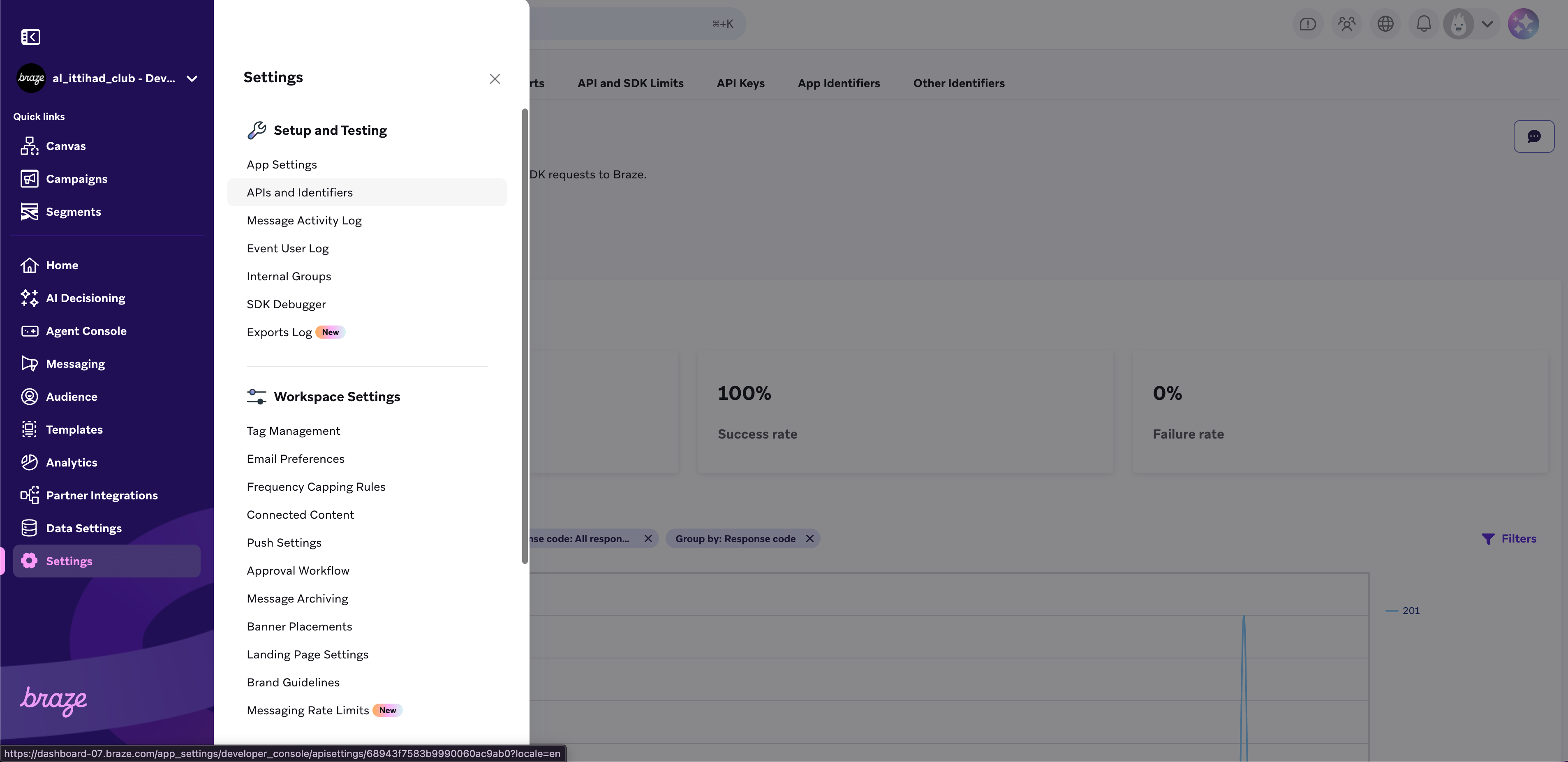
Braze settings
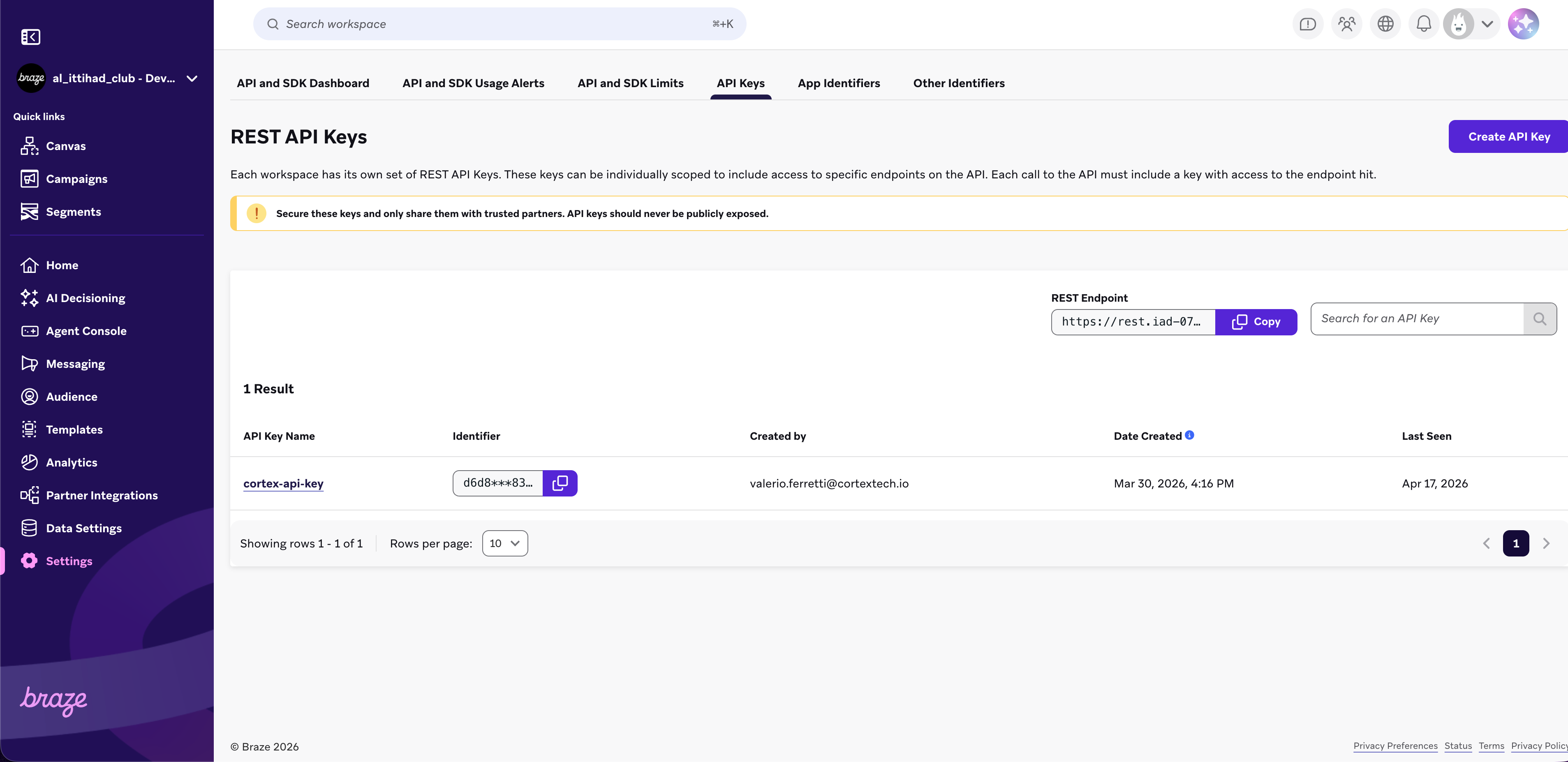
Braze API keys
In the permission form, the checkbox User Data must be checked, to give the integration permission to create, delete and set attributes on user profiles, as shown in the following picture.
Audience Synchronisation
Synchronising an audience from Cortex FDP to Braze means creating a Braze user profile for every SCV user in your Cortex audience, with a set fields and custom data fields whose values are taken from Cortex FDP. Of course, if a target user profile already exists in Braze, it will be updated rather than created. User profiles created by the Braze Audiences integration are uniquely identified by the field external_id, which is set to the SCV user ID of the corresponding SCV user in Cortex FDP.
The following table summarises the set of fields that are synchronised between SCV users in Cortex FDP and user profiles in Braze. If you need to synchronise data fields that are not in this list, get in touch with the Cortex development team.
| Source field in Cortex FDP | Target field on a Braze user profile |
|---|---|
| SCV User ID | external_id |
| Email Address | |
| Mobile Number | phone |
| First Name | first_name |
| Last Name | last_name |
| Birthday | dob |
| Age | age (custom data field) |
| Gender | gender (custom data field) |
| Created At | created_at (custom data field) |
| Updated At | updated_at (custom data field) |
Additionally, two more custom data fields are synchronised to Braze that are crucial for this integration: audience_codes and audience_names. These fields encode Cortex audience membership within Braze. By targeting either one of them, it is possible to create a segment in Braze that tracks an audience in Cortex and, therefore, to target a Cortex audience with a Braze campaign.
- audience_codes is an array of Cortex audience codes that a given user belongs to. When synchronising a Cortex audience to Braze, each newly created user profile in Braze will have the audience code of that source audience in Cortex as the only element of the audience_codes array. If the user profile already existed in Braze, the audience code of the source audience will be appended to the array. If the audience_codes array on the Braze user profile already contained the audience code of the source Cortex audience, the field will be left untouched.
- audience_names is an array of Cortex audience names that a given user belongs to. A Cortex audience name is a string chosen by the user when creating an audience to identify it in a user-friendly way. The array audience_names in Braze behaves exactly like the audience_codes array explained above.
What is a Cortex audience code?
A Cortex audience code is a technical field that is automatically assigned to an audience upon creation. It uniquely identifies an audience within Cortex systems. In contrast, the audience name is chosen by the user when creating an audience. An audience name in Cortex is not unique; it is possible for a user to create two Cortex audiences with the same name. In this case, it becomes impossible to distinguish between the two audiences in Braze when relying solely on the audience_names array. Conversely, audience codes are guaranteed to be unique, ensuring it is always possible to distinguish between two audiences in Braze by relying on the audience_codes field.
For the above reasons, when creating segments in Braze that track Cortex audiences, it is generally advised to rely on the audience_codes array rather than the audience_names array. Refer to the paragraph below, to find out the code of your Cortex audience.
How do I find the audience code in Cortex?
An audience code is a string matching the format AUDIENCE_ObjectID. It is possible to find an audience's ObjectID looking at the last portion of a URL, when opening an audience in Cortex as displayed in the following picture:
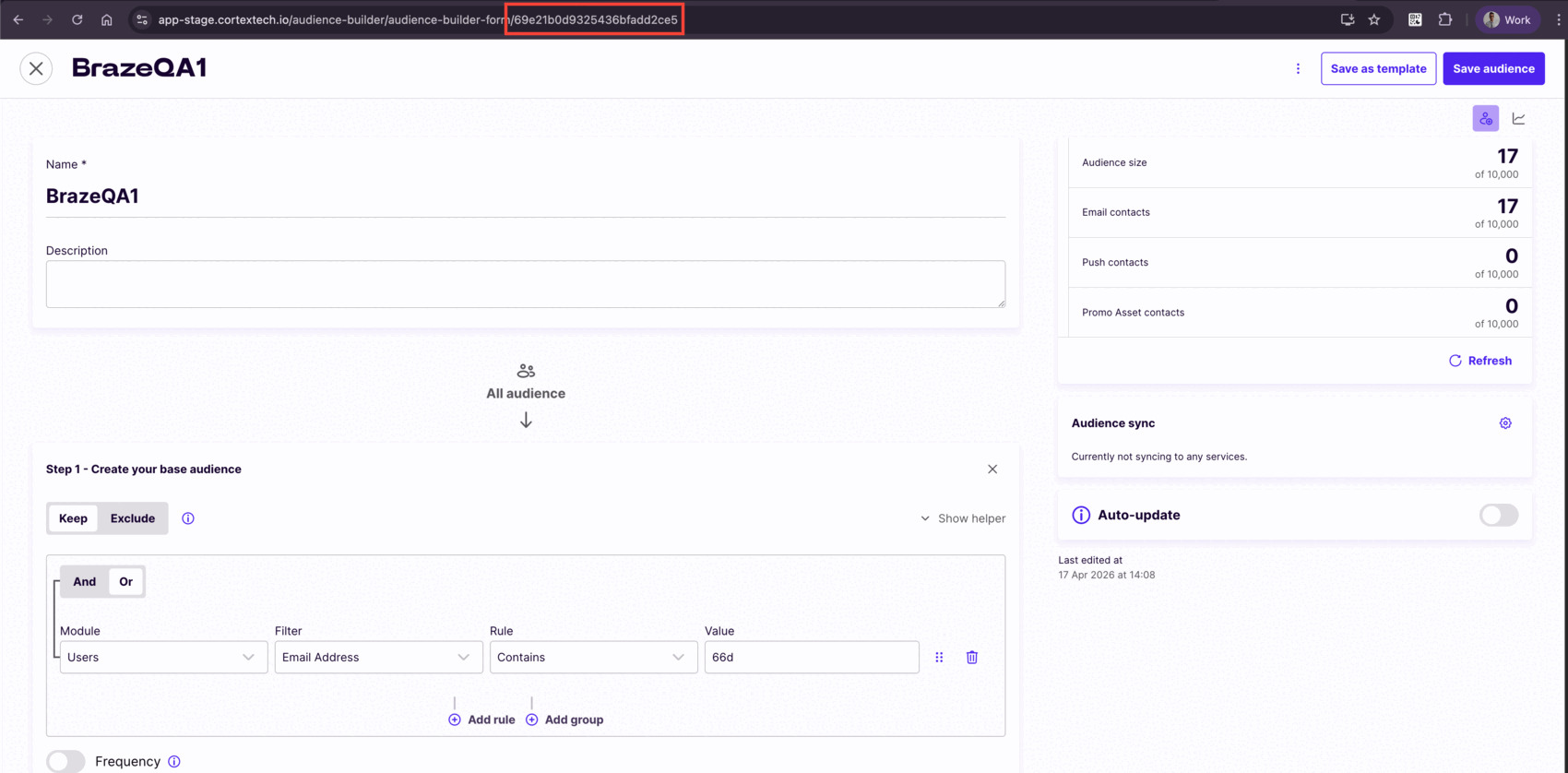
Cortex audience code
Braze synchronisation example
Considering the audience in the picture above, the audience name is BrazeQA1, the audience code is AUDIENCE_69e21b0d9325436bfadd2ce5. When synchronising for the first time the audience BrazeQA1 with Braze, 17 user profiles will be created in Braze, with the data fields discussed above. BrazeQA1 will be appended to the audience_names array of each target user profile, and AUDIENCE_69e21b0d9325436bfadd2ce5 will be appended to the audience_codes array of each target user profile, as displayed in the following picture:
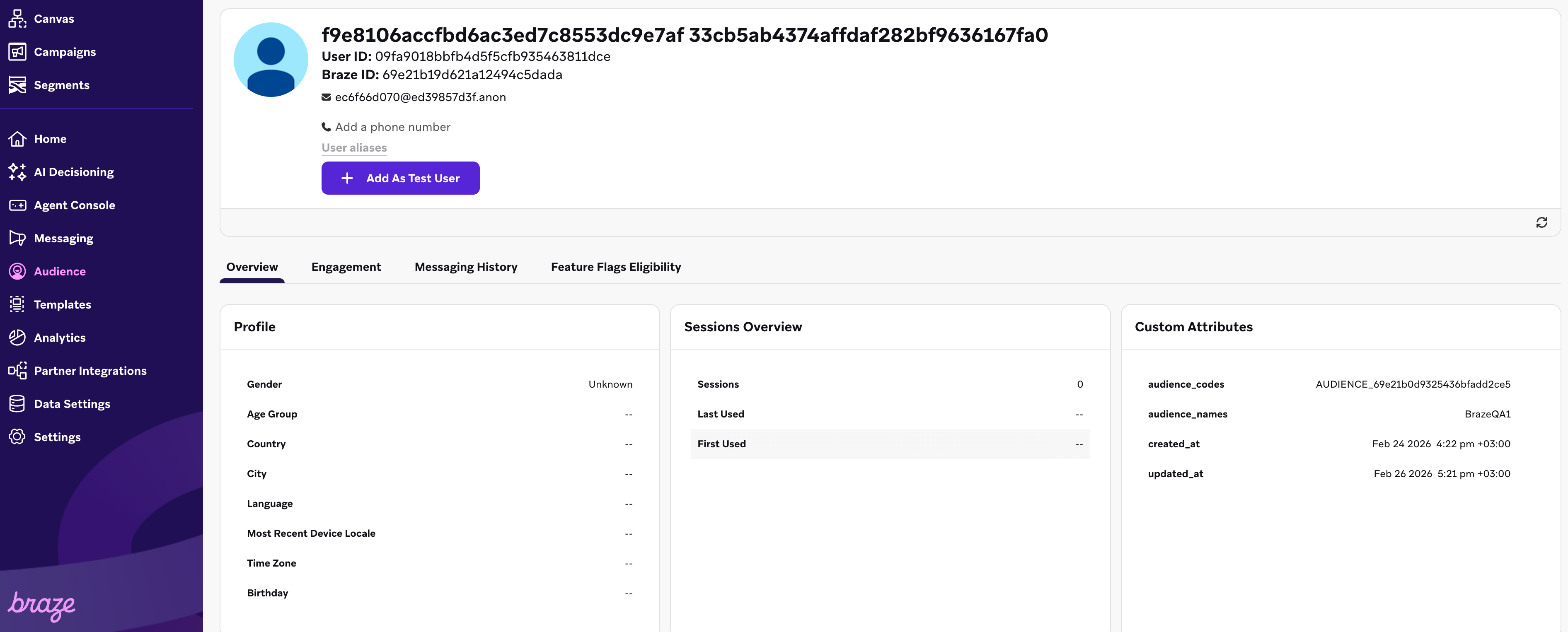
Braze user profile
Of course, the same SCV user may be part of several Cortex audiences, set to synchronise to Braze. The following picture shows the same user profile in Braze, after the synchronisation of the audience BrazeQA2, provided that the displayed user profile belongs to both audiences:
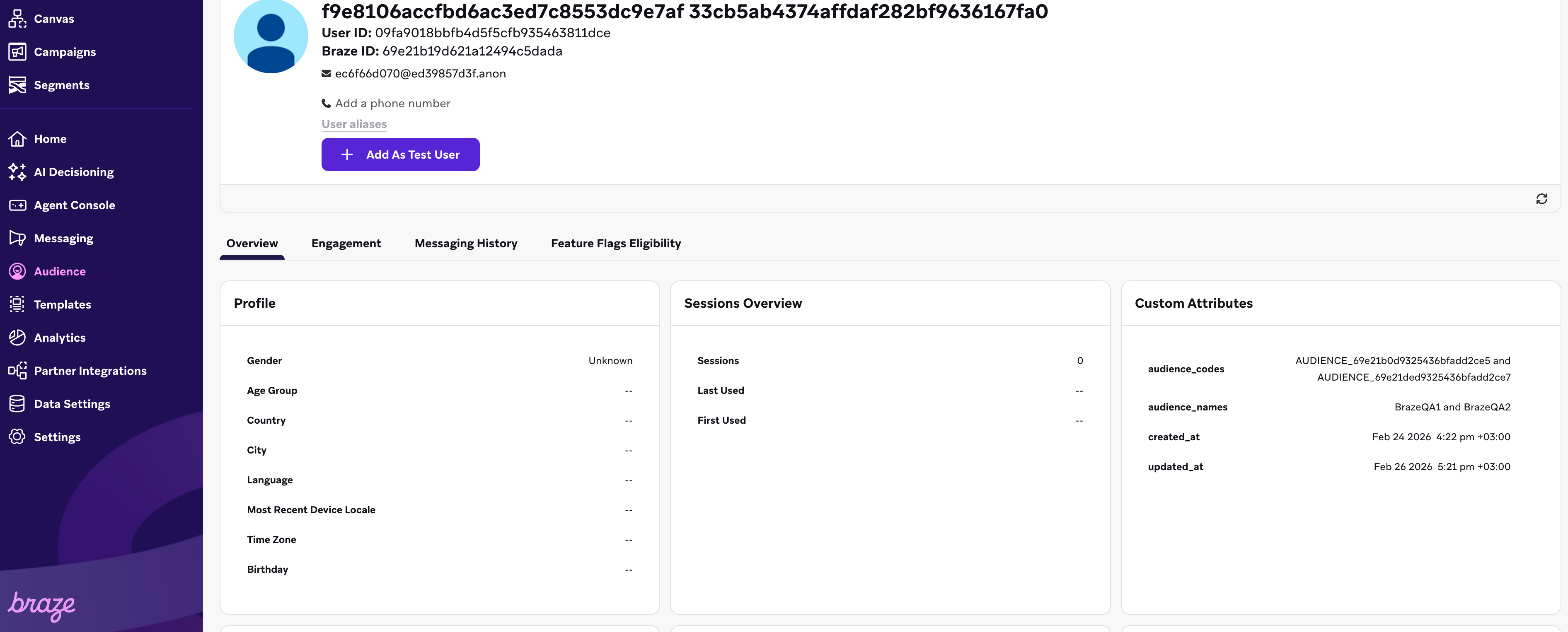
Braze user profile with multiple audience membership
The array audience_names and the array audience_codes contain 2 items, to reflect the fact that the given user profile belong to more than one Cortex audience.
How to enable the Braze Audiences integration
To enable the Braze synchronisation for a given audience, it is necessary to open up that audience, click on the settings icon in the Audience sync panel, select Braze from the list of supported integrations and click on the Confirm button, as shown in the following picture. If Braze is not listed among the supported integrations, get in touch with our development team.
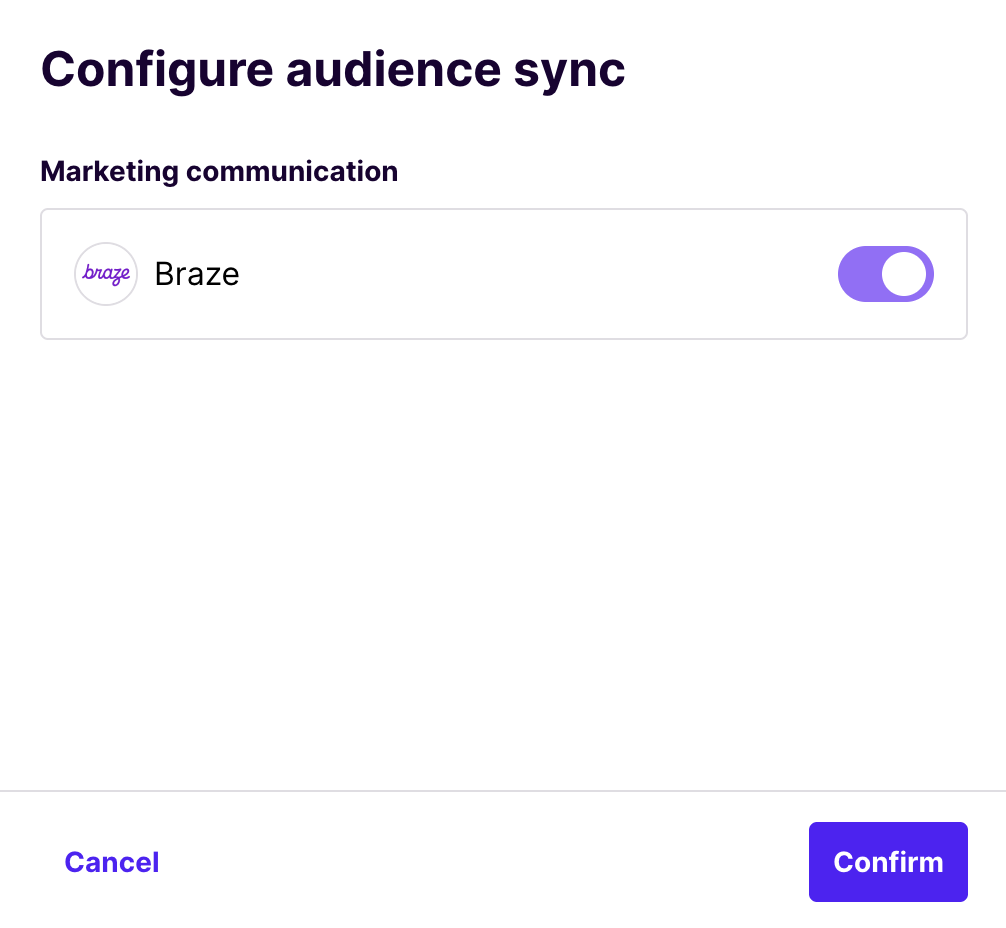
Braze option in the Cortex sync panel
Once the Braze integration is enabled for one given audience, it will be possible to manually trigger the synchronisation by clicking on the Sync Audience button, in the top right corner of the screen.
Automatic Audience Synchronisation
An audience will be automatically synchronised to Braze every three hours, if the Braze integration is enabled for that audience and the Auto-update option is set on it, as shown in the following picture, right below the Audience sync panel:
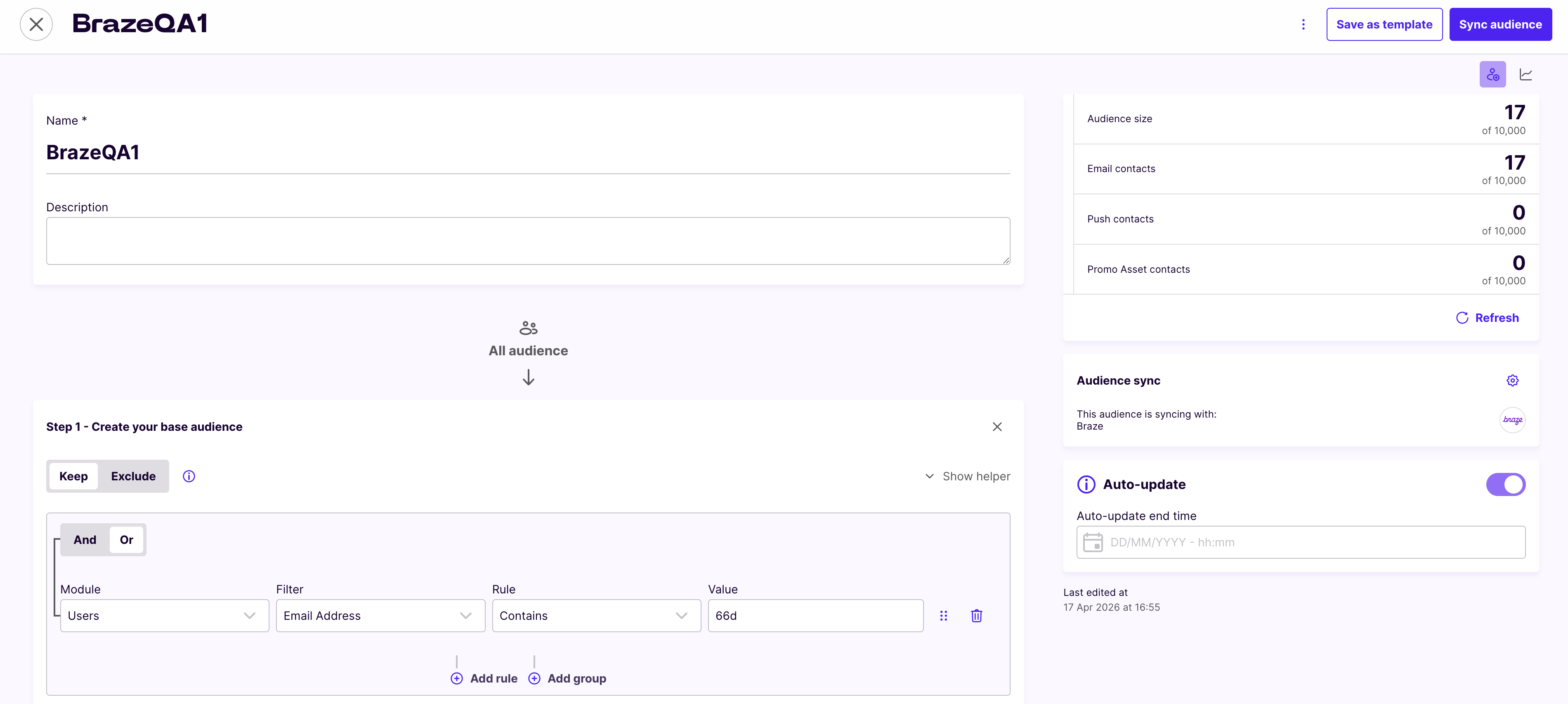
Audience syncing to Braze in Audience Builder
If you want your audience to be automatically synchronised on a regular basis, make sure you enable the Braze integration for that audience (as explained above) and you check the Auto-update option.
Deleting an audience
When deleting an audience that was set up to be synchronised to Braze, the target user profiles will not be deleted from Braze. Instead, the name and code of the deleted Cortex audience will be removed from the array audience_names and audience_codes, in the Braze user profile.
Updated 6 months ago