
SSO Data Sharer Webhook
Real-time information about SSO users can be pushed to a third party system via the data sharer webhooks described in this document.
Introduction
This service notifies an external third-party system about SSO users, sharing their profile and contact preferences. Third parties use it to ingest data about SSO users and keep it up to date. An update is sent whenever a user does something that changes their data, for example updating their first name or opting in or out of a contact method.
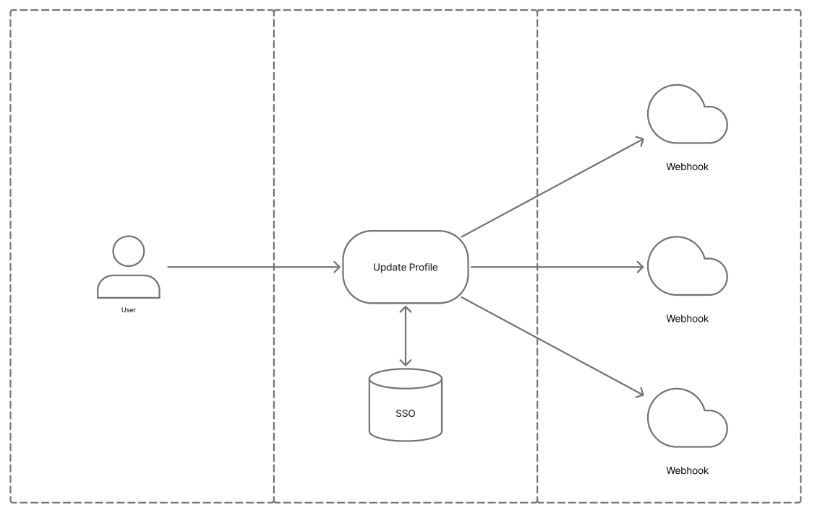
There are two webhooks, each a separate service you can subscribe to:
| Service in Cortex | Events | Payload |
|---|---|---|
| Fan profile | profile.updated, profile.deleted | The full user profile, see Profile payload |
| Preferences centre | preferences.updated | The user's preferences, see Preferences webhook |
A client can subscribe to both, and can register more than one webhook for each.
Setting up a webhook
Webhooks are managed in Cortex under Settings → Webhooks. You need permission to manage webhooks.
- Select Add webhook.
- Choose the Service: Fan profile or Preferences centre.
- Choose the Events to receive.
- Enter the Webhook URL. It must be
https://if the key is sent in a header or the URL (see Authentication). - Enter or generate a Secret of at least 16 characters. It signs every delivery. It is write-only: once saved, Cortex shows only Secret configured. If the secret is lost, set a new one and update your receiver.
- Choose the Payload version (see Model versions) and the delivery options below.
| Option | Applies to | Default | What it does |
|---|---|---|---|
| Payload version | Both | None, required | The payload model version this webhook receives. Fan profile: 2 or 3. Preferences centre: 1. |
| Include secondary account links | Fan profile, version 3 | Off | Adds accountLinks.secondaryLinks to the payload |
| Key delivery | Both | Signature only | Signature only, Signature and key in header (x-cortex-webhook-key), or Signature and key in URL (?key= plus the header). See Authentication. |
| Send the bare payload | Both, with the key in a header or the URL | Off | Sends the payload on its own, without the envelope. Use it to move an existing integration without changing the receiver. |
| Deliver to Azure Event Hubs | Both | Off | See Azure Event Hubs |
Webhooks can be switched off and on, edited and deleted from the same screen. A webhook must be switched off before it can be deleted.
Existing integrationsWebhooks set up by the Cortex team before self-service keep working exactly as before: a bare payload with the key in the
keyquery parameter and thex-cortex-webhook-keyheader. To move one to a self-service webhook without changing the receiver, choose Signature and key in URL and Send the bare payload, with the same secret.
Delivery format
Each delivery is an HTTP POST to the webhook URL with Content-Type: application/json.
Example requests
How the request looks for a webhook URL of https://example.com/webhook and a secret of PzRt3Fs5cvs8P2pAqegwJk5VZtYJ0IDk, for each key delivery:
| Key delivery | Method | URL | Headers |
|---|---|---|---|
| Signature only (default) | POST | https://example.com/webhook | X-Cortex-Signature: t=2026-11-10T12:00:00Z,sha256=5f2b...e91c |
| Signature and key in header | POST | https://example.com/webhook | X-Cortex-Signature: t=...,sha256=...x-cortex-webhook-key: PzRt3Fs5cvs8P2pAqegwJk5VZtYJ0IDk |
| Signature and key in URL | POST | https://example.com/webhook?key=PzRt3Fs5cvs8P2pAqegwJk5VZtYJ0IDk | X-Cortex-Signature: t=...,sha256=...x-cortex-webhook-key: PzRt3Fs5cvs8P2pAqegwJk5VZtYJ0IDk |
| Existing integration set up by the Cortex team (legacy) | POST | https://example.com/webhook?key=PzRt3Fs5cvs8P2pAqegwJk5VZtYJ0IDk | x-cortex-webhook-key: PzRt3Fs5cvs8P2pAqegwJk5VZtYJ0IDk |
The key in the URL and the x-cortex-webhook-key header are still supported, for existing integrations and for receivers that can't verify a signature. See Authentication. Legacy integrations set up by the Cortex team receive the bare payload, without the X-Cortex-Signature header.
Envelope or bare payload
The request body is in one of two shapes. Which one you get depends only on how the webhook is set up:
| Webhook setup | Body |
|---|---|
| Send the bare payload off, and Deliver to Azure Event Hubs off (the default) | Envelope: the payload is inside data |
| Send the bare payload on | Bare payload: the payload on its own |
| Deliver to Azure Event Hubs on | Bare payload: the payload on its own |
| Existing integration set up by the Cortex team (legacy) | Bare payload: the payload on its own |
The payload itself (the profile payload or the preferences payload) is identical in both shapes. The envelope only wraps it.
With the envelope (default)
{
  "id": "0b6f3f8e-5c1d-4a9e-9a57-3f2a6d0f9c41",
  "event": "profile.updated",
  "timestamp": "2026-11-10T12:00:00Z",
  "data": {
    "id": 6688176,
    "version": 3,
    "recordRevoked": false,
    "clientId": "CLIENT",
    "registerMetadata": { "registerSource": "XX", "registerType": "XX", "registerPlatform": "XX" },
    "userProfile": { "id": 6688176, "email": "[email protected]", "firstName": "Jane", "lastName": "Doe" },
    "clientPreferences": [],
    "entitlements": [],
    "accountLinks": []
  }
}| Field | Type | Definition |
|---|---|---|
| id | String (UUID) | Identifies the delivery. It is the same on every retry of that delivery, so use it to discard duplicates. |
| event | String | The event: profile.updated, profile.deleted or preferences.updated |
| timestamp | String, RFC 3339 UTC, seconds | When the delivery was signed. Equal to t= in the signature header. |
| data | Object | The payload, for the webhook's payload version |
Without the envelope (bare payload)
The same delivery, with Send the bare payload or Deliver to Azure Event Hubs on. The body is exactly what was inside data above:
{
  "id": 6688176,
  "version": 3,
  "recordRevoked": false,
  "clientId": "CLIENT",
  "registerMetadata": { "registerSource": "XX", "registerType": "XX", "registerPlatform": "XX" },
  "userProfile": { "id": 6688176, "email": "[email protected]", "firstName": "Jane", "lastName": "Doe" },
  "clientPreferences": [],
  "entitlements": [],
  "accountLinks": []
}
Without the envelope there is no delivery id, event or timestamp in the body:
- Tell a deleted user from an update by
recordRevoked: true(theprofile.deletedevent). - The
X-Cortex-Signatureheader is still sent on self-service webhooks and still covers the whole body, so verification works the same way. - See Responses, retries and ordering for handling duplicates without the delivery
id.
profile.deleted is sent when the user has asked for their account to be deleted. Its payload has recordRevoked: true.
Authentication
Signature (always sent)
Every delivery carries an X-Cortex-Signature header:
X-Cortex-Signature: t=2026-11-10T12:00:00Z,sha256=5f2b...e91csha256 is the hex-encoded HMAC-SHA256 of t + "." + body, keyed with the webhook's secret. body is the raw request body exactly as received. To verify a delivery:
- Split the header into
tandsha256. - Compute HMAC-SHA256(secret,
t+.+ raw body) and hex-encode it. - Compare it with
sha256using a constant-time comparison. - Reject the delivery if
tis more than 5 minutes from your current time. This guards against replays. Each retry is signed again, so retries pass this check.
Verify against the raw bytes received, before parsing the JSON. Re-serialising the JSON changes the bytes and the signature will not match.
Node.js
const crypto = require('crypto');

function verifyCortexWebhook(secret, header, rawBody, toleranceSeconds = 300) {
  const match = /^t=([^,]+),sha256=([0-9a-f]+)$/.exec(header || '');
  if (!match) return false;
  const [, t, received] = match;

  const expected = crypto.createHmac('sha256', secret).update(`${t}.`).update(rawBody).digest('hex');
  if (expected.length !== received.length ||
      !crypto.timingSafeEqual(Buffer.from(expected), Buffer.from(received))) return false;

  return Math.abs(Date.now() - Date.parse(t)) / 1000 <= toleranceSeconds;
}
Python
import hashlib, hmac, re
from datetime import datetime, timezone

def verify_cortex_webhook(secret: str, header: str, raw_body: bytes, tolerance_seconds: int = 300) -> bool:
    match = re.fullmatch(r"t=([^,]+),sha256=([0-9a-f]+)", header or "")
    if not match:
        return False
    t, received = match.groups()

    expected = hmac.new(secret.encode(), t.encode() + b"." + raw_body, hashlib.sha256).hexdigest()
    if not hmac.compare_digest(expected, received):
        return False

    signed_at = datetime.fromisoformat(t.replace("Z", "+00:00"))
    return abs((datetime.now(timezone.utc) - signed_at).total_seconds()) <= tolerance_seconds
Key in a header or the URL (optional)
For receivers that can't verify a signature, the webhook can also send the secret itself:
| Key delivery | Also sends |
|---|---|
| Signature only (default) | Nothing else |
| Signature and key in header | x-cortex-webhook-key: <secret> |
| Signature and key in URL | ?key=<secret> on the URL, and the x-cortex-webhook-key header |
These modes require an https:// URL. A key in the URL can end up in proxy and server access logs, so prefer the signature, or the header if you need a key.
Azure Event Hubs
What is Azure Event Hubs?
Azure Event Hubs is Microsoft's managed event-streaming service. Instead of running your own web server to receive webhooks, you have the updates written straight into an event hub in your own Azure subscription. Your systems then read them from there, at their own pace:
- Your own consumers: read the events with the Event Hubs SDKs or the Kafka protocol.
- Azure services: Stream Analytics, Azure Functions, Microsoft Fabric and others can read from an event hub directly.
- Archiving: Event Hubs Capture can archive every event to Azure Storage or Data Lake.
This suits clients who already use Azure for their data platform. Events are kept in the hub for its retention period, so a consumer that is down catches up when it comes back instead of missing deliveries.
The terms used below:
| Term | Meaning |
|---|---|
| Namespace | The container for one or more event hubs, with its own host name: <namespace>.servicebus.windows.net |
| Event hub | The stream the events are written to, inside a namespace |
| Shared access policy | A named key with rights (Send, Listen, Manage). Cortex uses a policy's name and key to sign each request with a shared access signature (SAS) |
See Event Hubs features and terminology for more.
Setting up Azure
- Namespace. Create an Event Hubs namespace in the Azure portal, or use an existing one.
- Event hubs. Create one event hub per webhook, e.g.
cortex-sso-profilesfor the Fan profile webhook andcortex-preferencesfor the Preferences centre webhook. The two payloads have different shapes, so keeping them in separate hubs means each consumer reads one format. Choose the partition count and retention to suit your consumers. Retention is how long events stay readable if a consumer is down. - Shared access policy. On each event hub (not the namespace), open Settings → Shared access policies and add a policy with only the Send claim, e.g.
cortex-send. You can use the same policy name on every hub. Each hub's policy has its own keys, so each key can only send to its own hub. - Key. Copy each policy's Primary key. See Get an Event Hubs connection string for where to find it. You only need the key, not the full connection string. You end up with one key per event hub, and so one per webhook in Cortex.
- Consumers. Read the events with the Event Hubs SDKs, the Kafka protocol, or an Azure service such as Stream Analytics or Functions. Use your own consumer group for each reader.
Least privilegeCortex only needs Send on the one event hub each webhook delivers to. Never give Cortex the namespace's
RootManageSharedAccessKeyor any policy with Listen or Manage rights: those keys can read, and with Manage delete, your event hubs.A Send-only policy on the namespace also works, but its key can send to every event hub in the namespace. Prefer one policy per event hub. See Shared access signature authorization for Event Hubs.
Network restrictions. If the namespace limits public network access (IP firewall rules or private endpoints only), deliveries from Cortex are blocked. Ask the Cortex team for the outbound IP addresses to allow.
Event size. Each delivery is one event. Event Hubs limits an event to 256 KB on the Basic tier and 1 MB on Standard and above. Profile payloads are typically a few KB, growing with the number of preferences and account links.
Setting up the webhook in Cortex
Tick Deliver to Azure Event Hubs and fill in:
- Webhook URL: the event hub's REST endpoint,
https://<namespace>.servicebus.windows.net/<event-hub>/messages. This is the Send event endpoint. The host must end in.servicebus.windows.net. - Shared access policy name: the name of the policy on this webhook's event hub, from step 3, e.g.
cortex-send. - Shared access policy key: that policy's key, from step 4. Use the key from the same event hub as the URL: a key from another hub's policy is rejected with
401. For an Event Hubs webhook, this key is the webhook's secret, and there is no separate secret to set. - Token lifetime (seconds): optional. The default is 86400 (24 hours) and the maximum is 31536000 (one year). Cortex generates a new token before the old one expires, so the lifetime only limits how long a single intercepted token stays valid.
Rotating the key
Each policy has a primary and a secondary key, so you can rotate without missing deliveries:
- Update the webhook in Cortex to use the policy's secondary key.
- Regenerate the primary key in Azure.
- Next time, switch back the other way.
Regenerating a key invalidates the tokens made from it straight away. If you regenerate the key Cortex is using before updating the webhook, deliveries fail with 401 and are retried for a limited time.
What is sent
- Authorization: each request carries an
Authorization: SharedAccessSignature sr=...&sig=...&se=...&skn=...header. It is a SAS token generated from the policy name and key. - Event body: the bare payload, with no envelope. Each delivery becomes one event in the hub.
- Event properties: Event Hubs stores custom request headers as the event's user (application) properties. So each event also carries the
X-Cortex-Signatureheader, signed with the policy key, which you can verify as described in Signature. - Not used: key delivery and Send the bare payload don't apply.
- Failures and retries: Event Hubs answers
201 Createdon success. Any other response, e.g.401for a wrong key or policy name, is treated as a failure and retried like any other webhook delivery.
Turning Event Hubs on or off in Cortex clears the secret, so the policy key is never reused as a webhook secret or the other way round.
Responses, retries and ordering
- Success: respond with any
2xxstatus within 30 seconds. The response body is ignored. - Retries: a timeout, a connection error, a
5xxor any other non-2xxresponse counts as a failure.- Connection errors and
5xxresponses are retried immediately, up to 3 times. - After that, the delivery is retried every 5 minutes, a limited number of times, then dropped.
- Connection errors and
- Duplicates: deliveries are at least once. Use the envelope
idto discard duplicates. With the bare payload there is no envelopeid, so make processing idempotent on the user ID anduserProfile.lastUpdated, orcreatedAtfor preferences. - Ordering: deliveries are not guaranteed to arrive in order. Use
userProfile.lastUpdated(profile) orcreatedAt(preferences) to ignore an update older than one you already have. - Redirects: followed only to the same host, including from
httptohttps. A redirect to another host is not followed and counts as a failure, so the secret is never sent to a host you didn't configure. - Changes take effect quickly: switching a webhook off, deleting it or changing its secret applies within about 30 seconds to deliveries not yet sent, including retries already queued.
Profile payload
This is the payload of the Fan profile webhook: the envelope's data, or the whole body for a bare payload or Event Hubs. Every delivery contains the full user profile, regardless of what changed.
| Field | Type | Definition |
|---|---|---|
| id | Number | The user's unique SSO ID |
| version | Number | The payload model version. It is the version the webhook is pinned to in Cortex (see Model versions). |
| recordRevoked | Boolean | True if the user has asked for their account to be deleted under GDPR. Sent with the profile.deleted event. You must either delete the user record from your system or remove all PII associated with this user's SSO ID. |
| clientId | String | The ID associated with this client e.g. CORTEX |
| registerMetadata.registerSource | String | The source location the user first registered |
| registerMetadata.registerType | String | The type of registration |
| registerMetadata.registerPlatform | String | The platform the user registered on |
| userProfile.id | Number | The user's unique SSO ID |
| userProfile.email | String | The user's email address |
| userProfile.emailVerified | Boolean | True if the user's email is verified - false otherwise |
| userProfile.guardianEmail | String | The email address of their guardian if the user is a minor |
| userProfile.minorId | String | If the user is a minor this is their username/nickname |
| userProfile.firstName | String | The user's first name |
| userProfile.otherNames | String | The user's middle name |
| userProfile.lastName | String | The user's last name |
| userProfile.title | String | The user's title, e.g. Mr, Mrs, Dr |
| userProfile.birthDate | ISO 8601 Datetime | The user's date of birth |
| userProfile.gender | String | The user's gender. Based on RFC 6350: M = Male, F = Female, O = Other, N = None or not applicable, U = Unknown |
| userProfile.address1 | String | The user's address line 1 |
| userProfile.address2 | String | The user's address line 2 |
| userProfile.town | String | The user's town |
| userProfile.region | String | The user's region / county |
| userProfile.country | String | The user's country |
| userProfile.postcode | String | The user's postcode |
| userProfile.contactNumber | String | The user's phone number |
| userProfile.screenName | String | The user's screen name / display name |
| userProfile.screenNameApproved | Boolean | True if the user's screen name has been approved through moderation |
| userProfile.profilePicture | String | URL to the user's profile picture |
| userProfile.profilePictureApproved | Boolean | True if the user's profile picture has been approved through moderation |
| userProfile.companyName | String | The user's company name |
| userProfile.companyPhoneNumber | String | The user's company phone number |
| userProfile.companyAddressOne | String | The user's company address line 1 |
| userProfile.companyAddressTwo | String | The user's company address line 2 |
| userProfile.companyTown | String | The user's company town |
| userProfile.companyCountry | String | The user's company country |
| userProfile.companyPostcode | String | The user's company postcode |
| userProfile.lastUpdated | ISO 8601 Datetime | The last time the user updated their profile information |
| userProfile.createdAt | ISO 8601 Datetime | The date and time the user created their SSO account |
| userProfile.metadata | JSON | Unstructured JSON object that contains additional information about the user, for example: "metadata": { "object": {}, "key": "value", "number": 1, "array": [1, "value"], "boolean": false } |
| userProfile.suspension | Object | If the user's account has been suspended this field will contain information about it. If the user is not suspended then this field will be null. |
| userProfile.suspension.type | String | The type of account suspension |
| userProfile.suspension.expiresAt | ISO 8601 Datetime | The date and time this suspension will elapse. If null this account is suspended indefinitely. |
| userProfile.suspension.reason | String | A free text field providing additional context for suspension reason. This field can be null. |
| userProfile.passwordReset | Boolean | True if the user has reset their password. This field may be absent if no password reset has occurred. |
| userProfile.lastPasswordReset | ISO 8601 Datetime | The date and time of the user's most recent password reset. Only present if a password reset has occurred. |
| userProfile.firstLogin | ISO 8601 Datetime | The date and time the user first logged in |
| userProfile.lastLogin | ISO 8601 Datetime | The date and time the user most recently logged in |
| clientPreferences | Array | This contains the list of account preferences available to the user |
| clientPreferences.clientId | String | The ID associated with this client i.e. CORTEX |
| clientPreferences.name | String | The display name of the preference |
| clientPreferences.description | String | The description of the preference |
| clientPreferences.key | String | The unique key for this preference. Note: this is unique per client ID, not per user. |
| clientPreferences.set | Boolean | If true this indicates that the user has responded to this preference. This is useful for some preferences where the user is not obliged to select an option i.e. a checkbox preference. In this case we know the user has acknowledged the preference but not chosen any options. |
| clientPreferences.options | Array | A list of options available to the user for this preference |
| clientPreferences.options.id | Number | The globally unique ID of this option |
| clientPreferences.options.value | String | The display text for this option |
| clientPreferences.options.metadata | Object | Key / value pairs of additional metadata associated with this option. Both keys and values are strings. |
| clientPreferences.options.selected | Boolean | True if the user has selected this option - false otherwise |
| entitlements | Array | A list of active entitlements this user has. Expired entitlements are excluded. Version 3 only — this field is not present in version 2 payloads. |
| entitlements.id | String | The ID of this entitlement |
| entitlements.name | String | The name of this entitlement |
| entitlements.validFrom | ISO 8601 Datetime | The date and time this entitlement is valid from |
| entitlements.validTo | ISO 8601 Datetime | The date and time this entitlement is valid to. This will be null for entitlements that are open ended or never expire i.e. a lifetime membership or staff entitlement. |
| accountLinks | Array | A list of account IDs linked to this SSO account. Version 3 only — this field is not present in version 2 payloads. |
| accountLinks.sourceSystemId | String | The system this account link relates to e.g. cortex_VM for Ticketmaster |
| accountLinks.sourceSystemUserId | String | The ID of the user's account within that system |
| accountLinks.sourceSystemCreatedAt | ISO 8601 Datetime | The date and time this account link was created at the source, i.e. at Ticketmaster. |
| accountLinks.createdAt | ISO 8601 Datetime | The date and time this account link was created |
| accountLinks.lastModified | ISO 8601 Datetime | The date and time this account link was last updated |
| accountLinks.primary | Boolean | True if this is the primary account link for this source system |
| accountLinks.secondaryLinks | Array | A list of secondary account links associated with this primary link. Each entry has the same structure as an accountLink. Only present when Include secondary account links is turned on for the webhook (payload version 3). |
Model versions
A webhook receives exactly the payload version chosen for it in Cortex. It is never moved to a newer version automatically, so a new version can't change what your receiver gets until you choose it. New webhooks should use the latest version.
Version 2 includes: id, version, recordRevoked, clientId, registerMetadata, userProfile, and clientPreferences.
Version 3 includes everything in Version 2, plus:
-
entitlements— the user's active entitlements -
accountLinks— external accounts linked to this SSO account (with optional secondary links)
The preferences webhook has one payload version, 1.
Example (version 3):
{
  "id": 6688176,
  "version": 3,
  "clientId": "CLIENT",
  "registerMetadata": {
    "registerSource": "XX",
    "registerType": "XX",
    "registerPlatform": "XX"
  },
  "entitlements": [
    {
      "id": "68623c8e5fab911b5396d1a9",
      "name": "pre season bundle 2026",
      "validFrom": "2026-03-18T17:51:20Z",
      "validTo": "2026-03-31T10:00:00Z"
    }
  ],
  "accountLinks": [
    {
      "sourceSystemId": "System4",
      "sourceSystemUserId": "fTVOpxDMyUmOwVXXX",
      "createdAt": "2021-06-20T15:29:57.58203Z",
      "lastModified": "2021-06-20T15:29:57.58203Z"
    },
    {
      "sourceSystemId": "XXXX_SG",
      "sourceSystemUserId": "718863",
      "createdAt": "2023-06-23T10:00:33.115011Z",
      "lastModified": "2023-06-23T10:00:33.115011Z"
    },
    {
      "sourceSystemId": "YYYY_VM",
      "sourceSystemUserId": "718863",
      "sourceSystemCreatedAt": "2024-12-03T09:09:27.445024Z",
      "createdAt": "2023-06-29T15:02:19.905433Z",
      "lastModified": "2024-12-03T09:09:27.463658Z"
    }
  ],
  "clientPreferences": [
    {
      "clientId": "CLIENT",
      "name": "Highlights, news, and videos",
      "description": "Send me the latest news and videos from the club, including transfers and match highlights",
      "set": true,
      "key": "001-highlights-news-videos",
      "options": [
        {
          "id": 958,
          "value": "Yes",
          "metadata": {
            "hidden": "false",
            "order": "1",
            "type": "opt-in",
            "visualType": "radio"
          },
          "selected": false
        },
        {
          "id": 959,
          "value": "No",
          "metadata": {
            "hidden": "false",
            "order": "2",
            "type": "opt-in",
            "visualType": "radio"
          },
          "selected": false
        }
      ]
    },
    {
      "clientId": "CLIENT",
      "name": "Tickets and Memberships",
      "description": "Send me ticket announcements and availability, Memberships, and Season Ticket information",
      "set": true,
      "key": "002-tickets-memberships",
      "options": [
        {
          "id": 960,
          "value": "Yes",
          "metadata": {
            "hidden": "false",
            "order": "1",
            "type": "opt-in",
            "visualType": "radio"
          },
          "selected": false
        },
        {
          "id": 961,
          "value": "No",
          "metadata": {
            "hidden": "false",
            "order": "2",
            "type": "opt-in",
            "visualType": "radio"
          },
          "selected": false
        }
      ]
    },
    {
      "clientId": "CLIENT",
      "name": "Club Shop",
      "description": "Send me the latest from the club shop",
      "set": true,
      "key": "003-club-shop",
      "options": [
        {
          "id": 962,
          "value": "Yes",
          "metadata": {
            "hidden": "false",
            "order": "1",
            "type": "opt-in",
            "visualType": "radio"
          },
          "selected": false
        },
        {
          "id": 963,
          "value": "No",
          "metadata": {
            "hidden": "false",
            "order": "2",
            "type": "opt-in",
            "visualType": "radio"
          },
          "selected": false
        }
      ]
    },
    {
      "clientId": "CLIENT",
      "name": "Premium Hospitality and commercial opportunities",
      "description": "Send me Premium hospitality news and offers, and commercial opportunities",
      "set": true,
      "key": "004-premium-hospitality-commercial",
      "options": [
        {
          "id": 964,
          "value": "Yes",
          "metadata": {
            "hidden": "false",
            "order": "1",
            "type": "opt-in",
            "visualType": "radio"
          },
          "selected": false
        },
        {
          "id": 965,
          "value": "No",
          "metadata": {
            "hidden": "false",
            "order": "2",
            "type": "opt-in",
            "visualType": "radio"
          },
          "selected": false
        }
      ]
    },
    {
      "clientId": "CLIENT",
      "name": "Venue hire and events",
      "description": "Send me club events and venue hire communications",
      "set": true,
      "key": "005-venue-hire-events",
      "options": [
        {
          "id": 966,
          "value": "Yes",
          "metadata": {
            "hidden": "false",
            "order": "1",
            "type": "opt-in",
            "visualType": "radio"
          },
          "selected": false
        },
        {
          "id": 967,
          "value": "No",
          "metadata": {
            "hidden": "false",
            "order": "2",
            "type": "opt-in",
            "visualType": "radio"
          },
          "selected": false
        }
      ]
    },
    {
      "clientId": "CLIENT",
      "name": "Partners and sponsors",
      "description": "Send me news and promotions from club partners",
      "set": true,
      "key": "006-partners-sponsors",
      "options": [
        {
          "id": 968,
          "value": "Yes",
          "metadata": {
            "hidden": "false",
            "order": "1",
            "type": "opt-in",
            "visualType": "radio"
          },
          "selected": false
        },
        {
          "id": 969,
          "value": "No",
          "metadata": {
            "hidden": "false",
            "order": "2",
            "type": "opt-in",
            "visualType": "radio"
          },
          "selected": false
        }
      ]
    },
    {
      "clientId": "CLIENT",
      "name": "Club Foundation",
      "description": "Send me the latest news and updates from the club foundation",
      "set": true,
      "key": "007-club-foundation",
      "options": [
        {
          "id": 970,
          "value": "Yes",
          "metadata": {
            "hidden": "false",
            "order": "1",
            "type": "opt-in",
            "visualType": "radio"
          },
          "selected": false
        },
        {
          "id": 971,
          "value": "No",
          "metadata": {
            "hidden": "false",
            "order": "2",
            "type": "opt-in",
            "visualType": "radio"
          },
          "selected": false
        }
      ]
    },
    {
      "clientId": "CLIENT",
      "name": "Women's Team",
      "description": "Send me the latest news and updates from the women's team",
      "set": true,
      "key": "008-womens-team",
      "options": [
        {
          "id": 972,
          "value": "Yes",
          "metadata": {
            "hidden": "false",
            "order": "1",
            "type": "opt-in",
            "visualType": "radio"
          },
          "selected": false
        },
        {
          "id": 973,
          "value": "No",
          "metadata": {
            "hidden": "false",
            "order": "2",
            "type": "opt-in",
            "visualType": "radio"
          },
          "selected": false
        }
      ]
    },
    {
      "clientId": "CLIENT",
      "name": "I am also happy to hear from the Club via SMS",
      "set": true,
      "key": "009-other-contact-methods-sms",
      "options": [
        {
          "id": 974,
          "value": "Yes",
          "metadata": {
            "hidden": "false",
            "order": "1",
            "type": "opt-in",
            "visualType": "radio"
          },
          "selected": false
        },
        {
          "id": 975,
          "value": "No",
          "metadata": {
            "hidden": "false",
            "order": "2",
            "type": "opt-in",
            "visualType": "radio"
          },
          "selected": false
        }
      ]
    }
  ],
  "userProfile": {
    "id": 6688176,
    "email": "[email protected]",
    "firstName": "Jane",
    "lastName": "Doe",
    "birthDate": "1988-01-01T00:00:00Z",
    "gender": "F",
    "address1": "1 Example Street",
    "address2": "Line 2",
    "town": "Exampletown",
    "region": "Example County",
    "country": "United Kingdom",
    "postcode": "AB1 2CD",
    "contactNumber": "07700900000",
    "lastUpdated": "2026-03-18T17:51:52.4Z",
    "metadata": {},
    "createdAt": "2021-06-20T12:12:08.178Z",
    "passwordReset": true,
    "lastPasswordReset": "2026-03-03T14:25:51.557038Z",
    "firstLogin": "2021-06-29T11:14:07.162229Z",
    "lastLogin": "2026-03-18T17:41:28.364391Z"
  }
}
Preferences webhook
In addition to the profile webhook described above, the data sharer supports a separate preferences webhook. This is a dedicated channel for receiving real-time preference change notifications with a richer preference data model.
The preferences webhook fires whenever a user updates their preference selections (e.g. opting in or out of a contact method, changing a preference option). It sends the preferences.updated event.
It covers anonymous users as well as SSO users: someone who sets their preferences through the preferences centre without an SSO account is sent with anonymous: true (see the anonymous user example). The profile webhook only covers SSO users, so anonymous preferences are only available from the preferences webhook.
Choose the Preferences centre service in Cortex to set it up. It is delivered, signed and retried exactly like the profile webhook. A client can receive both.
The profile webhook described above includes a clientPreferences section with basic preference data. The preferences webhook provides a richer, dedicated preference payload with additional fields.
| Capability | Profile Webhook | Preferences Webhook |
|---|---|---|
| Triggered by | Any SSO profile update | Preference selection changes only |
| Preference key & name | Yes | Yes |
| Option id, value, selected | Yes | Yes |
| Preference description | No | Yes |
| Preference type (OptIn, Global) | No | Yes |
| Visual type (Radio, Checkbox, Select) | No | Yes |
| Preference deprecated flag | No | Yes |
| Last updated timestamp | No | Yes |
| Option index (display ordering) | No | Yes |
| Option metadata (key/value pairs) | No | Yes |
| Option linked IDs (external system refs) | No | Yes |
| Option deprecated flag | No | Yes |
| Anonymous (non-SSO) users | No | Yes (anonymous: true) |
| User profile data (name, address, etc.) | Yes (full profile) | No |
| Entitlements | Yes (v3 only) | No |
| Account links | Yes (v3 only) | No |
Example payloads
These are the envelope's data for the preferences.updated event, or the whole body for a bare payload or Event Hubs.
Anonymous user
{
  "clientId": "CLIENT",
  "userId": 27146712,
  "anonymous": true,
  "email": "[email protected]",
  "uuid": "8b4d1f52-6499-41e2-a6f4-26d8616988df",
  "preferences": [
    {
      "key": "001-highlights-news-videos",
      "name": "Highlights, news, and videos",
      "description": "Send me the latest news and videos from the club, including transfers and match highlights",
      "set": false,
      "type": "OptIn",
      "visualType": "Radio",
      "deprecated": false,
      "lastUpdated": null,
      "options": [
        {
          "id": 958,
          "index": 1,
          "value": "Yes",
          "metadata": {},
          "linkedIds": [],
          "selected": false,
          "deprecated": false
        },
        {
          "id": 959,
          "index": 2,
          "value": "No",
          "metadata": {},
          "linkedIds": [],
          "selected": false,
          "deprecated": false
        }
      ]
    },
    {
      "key": "002-tickets-memberships",
      "name": "Tickets and Memberships",
      "description": "Send me ticket announcements and availability, Memberships, and Season Ticket information",
      "set": false,
      "type": "OptIn",
      "visualType": "Radio",
      "deprecated": false,
      "lastUpdated": null,
      "options": [
        {
          "id": 960,
          "index": 1,
          "value": "Yes",
          "metadata": {},
          "linkedIds": [],
          "selected": false,
          "deprecated": false
        },
        {
          "id": 961,
          "index": 2,
          "value": "No",
          "metadata": {},
          "linkedIds": [],
          "selected": false,
          "deprecated": false
        }
      ]
    },
    {
      "key": "003-club-shop",
      "name": "Club Shop",
      "description": "Send me the latest from the club shop",
      "set": false,
      "type": "OptIn",
      "visualType": "Radio",
      "deprecated": false,
      "lastUpdated": null,
      "options": [
        {
          "id": 962,
          "index": 1,
          "value": "Yes",
          "metadata": {},
          "linkedIds": [],
          "selected": false,
          "deprecated": false
        },
        {
          "id": 963,
          "index": 2,
          "value": "No",
          "metadata": {},
          "linkedIds": [],
          "selected": false,
          "deprecated": false
        }
      ]
    }
  ],
  "version": 1,
  "createdAt": "2026-03-18T17:41:02.949459786Z"
}
Real SSO user
{
  "clientId": "CLIENT",
  "userId": 6688176,
  "anonymous": false,
  "email": "[email protected]",
  "uuid": "1ed05d06-c7e2-4637-a184-1fd0073b7727",
  "preferences": [
    {
      "key": "001-highlights-news-videos",
      "name": "Highlights, news, and videos",
      "description": "Send me the latest news and videos from the club, including transfers and match highlights",
      "set": true,
      "type": "OptIn",
      "visualType": "Radio",
      "deprecated": false,
      "lastUpdated": "2026-03-18T17:41:48.769214Z",
      "options": [
        {
          "id": 958,
          "index": 1,
          "value": "Yes",
          "metadata": {},
          "linkedIds": [],
          "selected": false,
          "deprecated": false
        },
        {
          "id": 959,
          "index": 2,
          "value": "No",
          "metadata": {},
          "linkedIds": [],
          "selected": true,
          "deprecated": false
        }
      ]
    },
    {
      "key": "002-tickets-memberships",
      "name": "Tickets and Memberships",
      "description": "Send me ticket announcements and availability, Memberships, and Season Ticket information",
      "set": true,
      "type": "OptIn",
      "visualType": "Radio",
      "deprecated": false,
      "lastUpdated": "2026-03-18T17:41:48.769214Z",
      "options": [
        {
          "id": 960,
          "index": 1,
          "value": "Yes",
          "metadata": {},
          "linkedIds": [],
          "selected": false,
          "deprecated": false
        },
        {
          "id": 961,
          "index": 2,
          "value": "No",
          "metadata": {},
          "linkedIds": [],
          "selected": true,
          "deprecated": false
        }
      ]
    },
    {
      "key": "003-club-shop",
      "name": "Club Shop",
      "description": "Send me the latest from the club shop",
      "set": true,
      "type": "OptIn",
      "visualType": "Radio",
      "deprecated": false,
      "lastUpdated": "2026-03-18T17:41:48.769214Z",
      "options": [
        {
          "id": 962,
          "index": 1,
          "value": "Yes",
          "metadata": {},
          "linkedIds": [],
          "selected": false,
          "deprecated": false
        },
        {
          "id": 963,
          "index": 2,
          "value": "No",
          "metadata": {},
          "linkedIds": [],
          "selected": true,
          "deprecated": false
        }
      ]
    }
  ],
  "version": 1,
  "createdAt": "2026-03-18T17:41:48.805845172Z"
}
Payload fields
| Field | Type | Required | Definition |
|---|---|---|---|
| clientId | String | Yes | The ID associated with this client |
| userId | Number | Yes | The user's unique SSO ID |
| anonymous | Boolean | Yes | Whether this is an anonymous user |
| String | Yes | The user's email address | |
| minorId | String | Optional | If the user is a minor, this is their username/nickname |
| guardianEmail | String | Optional | The email address of their guardian if the user is a minor |
| uuid | String | Yes | A unique identifier for this user's account |
| version | Number | Yes | The payload version. Always 1. |
| createdAt | ISO 8601 Datetime | Yes | The timestamp of this webhook event |
| preferences | Array | Yes | The user's current preference selections |
| preferences.key | String | Yes | The unique key identifying this preference |
| preferences.name | String | Yes | The display name of the preference |
| preferences.description | String | Optional | A description of the preference |
| preferences.set | Boolean | Optional | True if the user has responded to this preference, even if no options were selected. May be null. |
| preferences.type | String | Optional | The preference classification, e.g. OptIn, Global. May be null. |
| preferences.visualType | String | Yes | The UI display type: Radio, Checkbox, or Select |
| preferences.deprecated | Boolean | Yes | True if this preference has been deprecated |
| preferences.lastUpdated | ISO 8601 Datetime | Optional | The last time this specific preference was updated. May be null. |
| preferences.options | Array | Yes | The available options for this preference |
| preferences.options.id | Number | Yes | The globally unique ID of this option |
| preferences.options.index | Number | Yes | The display order index for this option |
| preferences.options.value | String | Yes | The display text for this option |
| preferences.options.metadata | Object | Yes | Key / value pairs of additional metadata associated with this option |
| preferences.options.linkedIds | Array | Yes | External system references linked to this option (e.g. OPTA football team IDs) |
| preferences.options.linkedIds.text | String | Optional | Display text for this linked ID. May be null. |
| preferences.options.linkedIds.sourceSystem | String | Yes | The external system this ID relates to |
| preferences.options.linkedIds.sourceSystemId | String | Yes | The ID within that external system |
| preferences.options.selected | Boolean | Optional | True if the user has selected this option. May be null. |
| preferences.options.deprecated | Boolean | Yes | True if this option has been deprecated |
Which webhook should I use?
- Use the profile webhook if you need the full user profile (name, email, address, etc.) alongside basic preference data, entitlements, and account links.
- Use the preferences webhook if you need detailed, real-time preference change data with enriched metadata (type, visual type, option metadata, linked IDs, deprecation flags), or the preferences of anonymous users who don't have an SSO account.
- You can subscribe to both, for example the profile webhook for identity data and the preferences webhook for consent changes.
Updated 12 days ago